
Year-long points
Retire the season spreadsheet.
A series is a whole winter of shows that has to add up to one champion in March. Right now that lives in a workbook on one person's laptop. Move it here: type the points off your own rulebook, and the standings publish themselves all season.
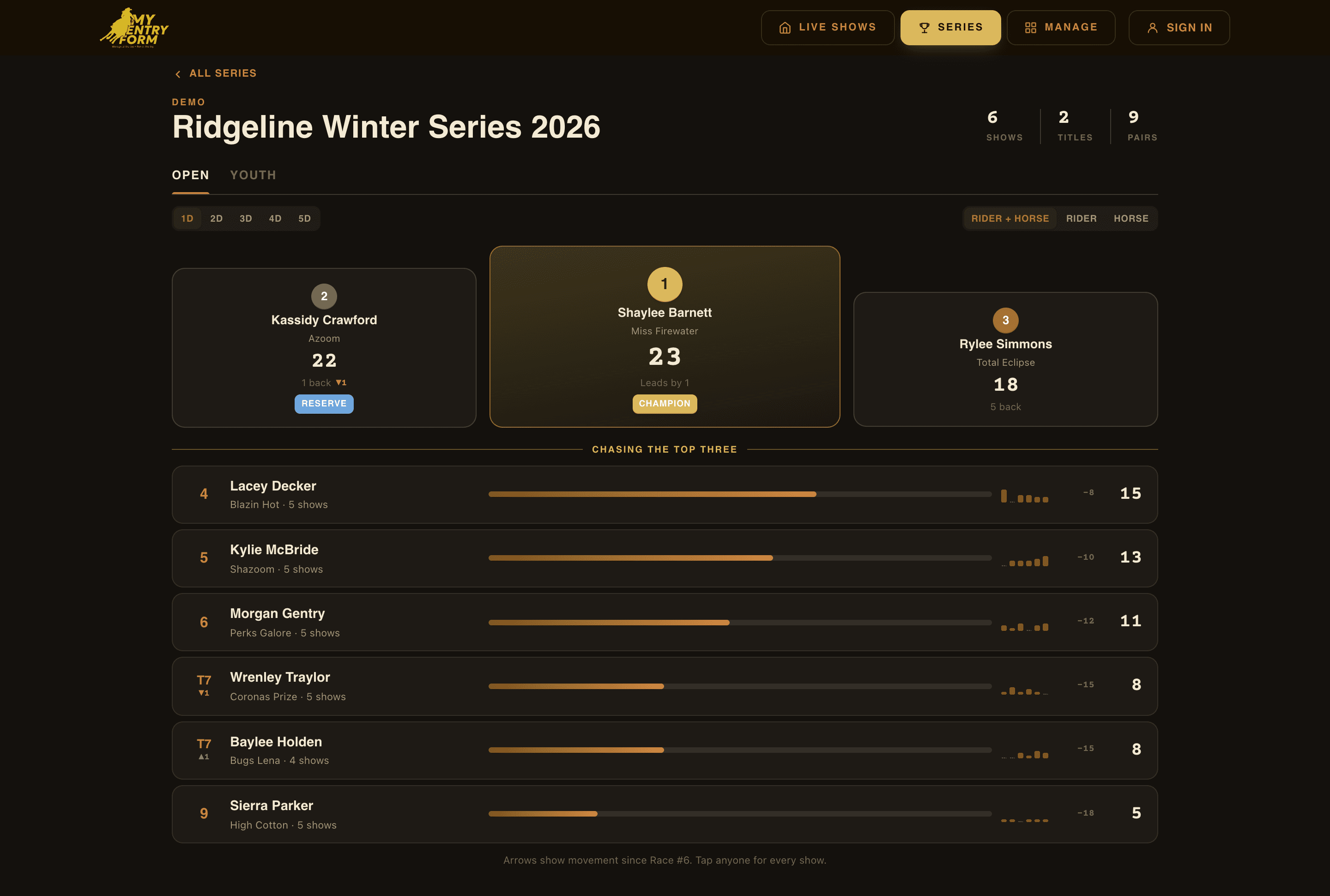
The public standings page — live, no login
How it runs
Four steps, then it runs itself until March.
Make the series
Name your season and add its titles — Open, Youth, Senior, whatever you hand out at the banquet. A title is a championship, and it keeps its identity all year even if you rename it in March.
Elect the classes
Building any show, mark which classes count toward the series and which title they feed. Nothing else about the show changes. Duplicate next month’s show and the election rides along.
Type the points
One screen holds the whole season — riders down the side, a column per show date. Read down the column off your association’s sheet. Enter moves to the next rider.
Standings post themselves
The public series page updates as you type. Riders and parents check it from their phone all season — no login, no app, nothing for you to send out.
The points grid
The whole season on one screen.
Not one show at a time. Riders down the side, a column for every show date — the same shape as the sheet you keep now. Try it: fill a column and watch what the tie does.
Ridgeline Winter Series · Open
Type the season, one column at a time
| Rider | Race #1Nov 8 | Race #2Dec 13 | Race #3Jan 10 | FinalsMar 7 | Total |
|---|---|---|---|---|---|
| Baylee Hobbs | — | — | — | — | — |
| Morgan West | — | — | — | — | — |
| Shelby Watts | — | — | — | — | — |
| Sierra Conner | — | — | — | — | — |
| Tessa Vickers | — | — | — | — | — |
Ties split
Race #3 has two riders tied for 3rd. They take up 3rd and 4th, so they split the two — 7.5 each, not 8 each.
Finals count 1.5×
Flip a column to 1.5× before you fill it. The box stores the finished number, so a parent adding the column by hand gets the same total.
Blank isn't zero
An empty box means not scored yet. A typed 0 means scored and earned nothing. They add up the same and read completely differently.
This is the real arithmetic — the grid above calls the same points module the app calls, so the tie split it shows you is the number your season would actually store.
Standings
Publish up to three boards, side by side.
Most series award the pair. Plenty award the rider. Owners want to know what the horse did. Pick any of the three and they sit on the same page behind one control.
Whichever you publish, it reads like a broadcast board: a podium for the top three, then everyone else with a bar for how far back they are, their points show by show, and an arrow for the places they gained or lost at the last race. Tap any rider for the whole season.
Rider + horse
The pair is the competitor. The same rider on a different horse is a different line in the standings — which is how most jackpot series award.
Rider
One rider, one line, every horse they showed. For a series where the buckle follows the person.
Horse
The HORSE is the competitor, and it collects the points of every rider who sat on it. Breeders and owners ask for this one.
The details that decide a season
Built around the arguments that happen in December.
Your rulebook, not ours
BBR scales off added money. NBHA re-ranks over district members only. IBRA counts your best fourteen shows. Nobody could reproduce fifteen rulebooks and get them all right — so we record the number you read off your own. It works with every association on day one.
Split per division
A 1D champion and a 4D champion are different titles, and every association we looked at awards that way. Standings split by division out of the box — and the split comes off the RUN, so one class can feed a title while its runs land across five divisions.
Ties split the points
Two riders tied for 3rd take up 3rd and 4th, so they split the two. The same rule the money already follows — which means points and dollars finally agree about what a tie is on the same results sheet.
Drop the worst show
Run a best-of-eight season and the dropped show stays on the sheet, struck through. A total nobody can reconcile is a total nobody trusts.
All-arounds
Roll a rider’s event titles into one year-end award. Points come from every event they entered, and one rider holds one all-around — so nobody wins the same award twice on two horses.
Year-end export
A PDF for the banquet and an Excel workbook for your records — a tab per title, a column per show. It reconciles against the sheet you were keeping by hand.
Two barns, one season
Run a series with another producer.
Invite another producer by email and their shows feed the same season. One set of titles, one standings page, and it shows up on both of your public pages.
Each side types only their own show's points — that rule is enforced on the server, not just hidden in the screen. The producer who created the series keeps its shape: the titles, the points table, the all-arounds. Renaming a championship in February moves the other barn's points into it, and that is the one thing nobody can reconstruct at the banquet.
What a partner can do
- Type points for their own shows
- See the joint standings
- Elect their classes into a title
- Rename a title or change the points table
- See the other barn’s payouts
Remove a partner and their classes come back out of the season. Their typed points stay on the runs, so putting them back restores the year exactly as it was.
One thing worth knowing up front.
We record the points you type. We don't check them against the results sheet — because the rule that produced them lives in your association's book, not in our software. That's the trade that makes this work with every association instead of three of them.
What you get back is the part that actually eats your winter: the sheet, the totals, the per-division splits, the drops, the all-arounds, and a standings page you never have to send anybody.
Start your season.
Build your first show, mark which classes count, and the series is running. You can add the rest of the dates as you go.
Questions?
Talk to the developer
No sales team, no support queue — when you reach out you're talking directly to the person who built MyEntryForm.